



Làm cách nào để tạo ví tiền điện tử?
Ví tiền điện tử là gì? Làm cách nào để tạo ví tiền điện tử?
Ví tiền điện tử (hoặc ví tiền điện tử) là một công cụ nền tảng để bước vào thế giới Web3. Không giống như các tài khoản ngân hàng truyền thống, bản thân ví không lưu trữ tài sản kỹ thuật số (chẳng hạn như Bitcoin hoặc Ethereum), mà giữ các khóa riêng quan trọng cần thiết để truy cập và quản lý tiền trên blockchain.
Cho dù bạn muốn lưu trữ các tài sản lớn, khám phá DeFi, giao dịch NFTs hay tương tác với các mạng Lớp 2 mới, việc nắm vững cách tạo ví tiền điện tử một cách an toàn là bước quan trọng đầu tiên. Hướng dẫn này sẽ hướng dẫn bạn các bước chung để tạo ví phi tập trung, không giám sát bằng cách sử dụng TokenPocket ví di động hoặc ví mở rộng.
Phần 1: Các bước tạo Ví tiền điện tử trên thiết bị di động
TokenPocket cung cấp cả phiên bản tiện ích mở rộng dành cho thiết bị di động và Chrome nên bạn có thể chọn phương pháp phù hợp nhất với mình.
1. Tải xuống và mở TokenPocket
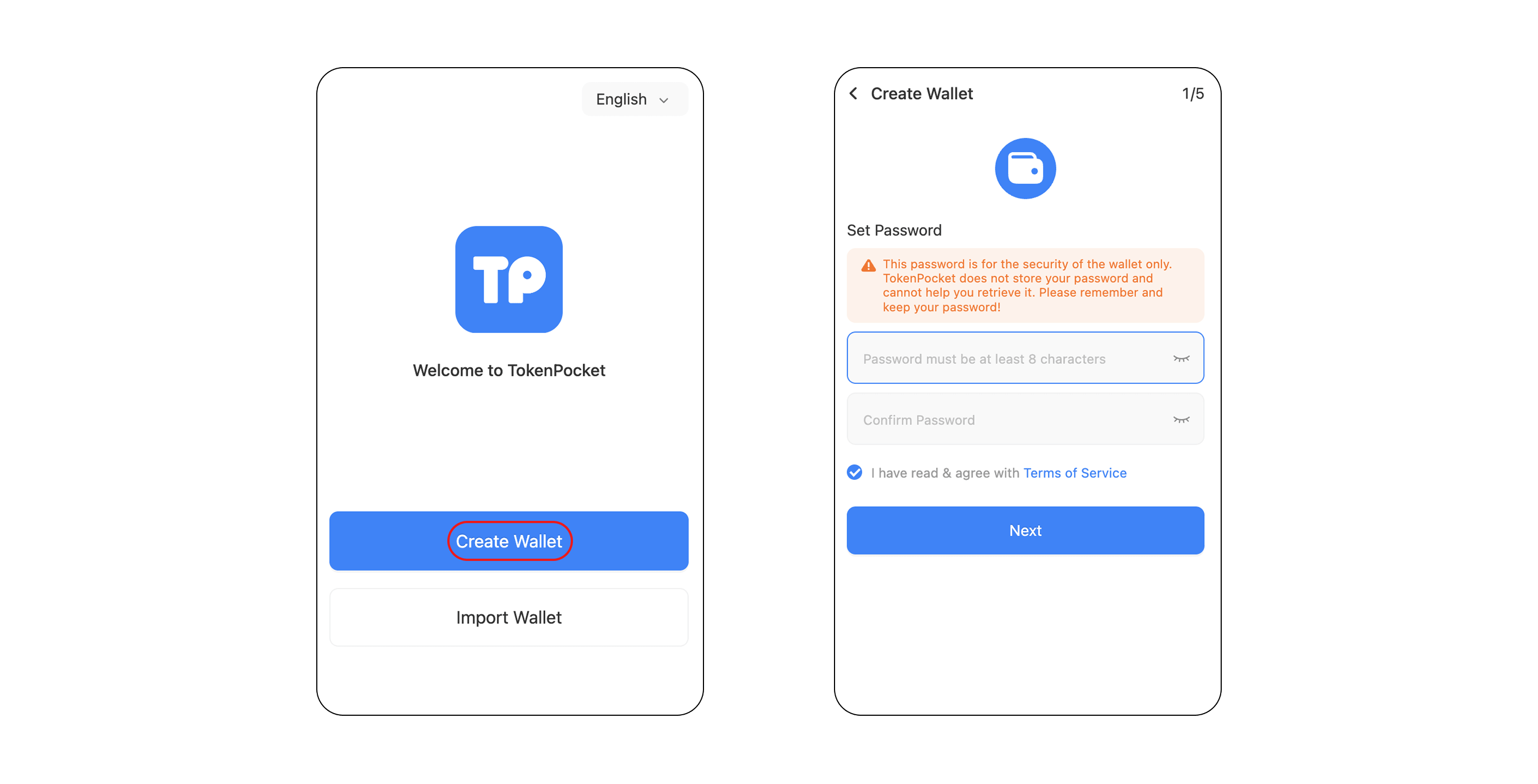
Tải xuống và mở TokenPocket Ứng dụng, sau đó nhấn "Tôi không có ví" và đặt mật khẩu ví của bạn trên trang bật lên.
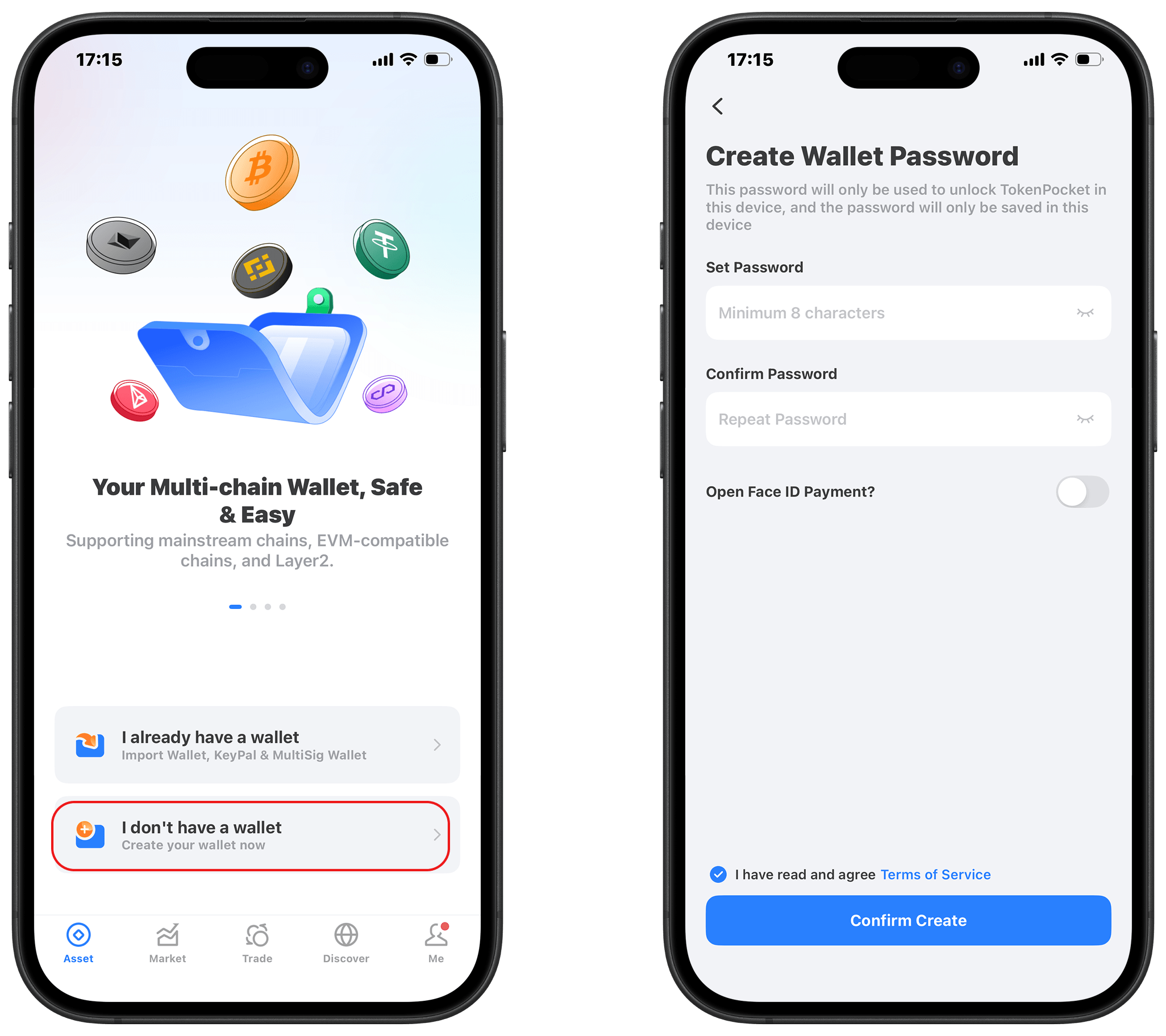
2. Chọn Loại Ví để Tạo
Chọn loại ví bạn muốn tạo. Ví dụ sau đây cho thấy việc tạo ví nhận dạng.
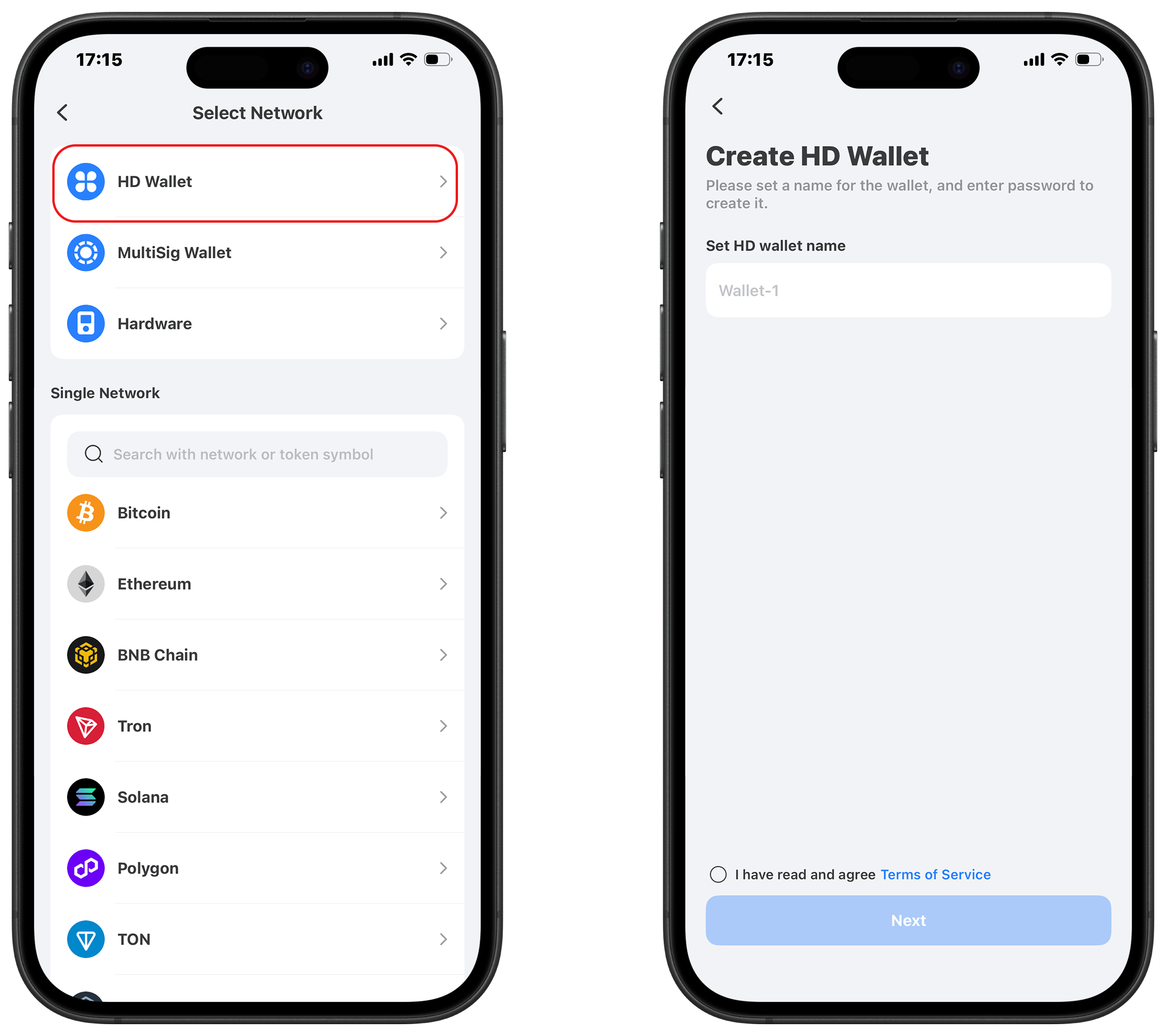
3. Sao lưu cụm từ ghi nhớ và khóa riêng của bạn
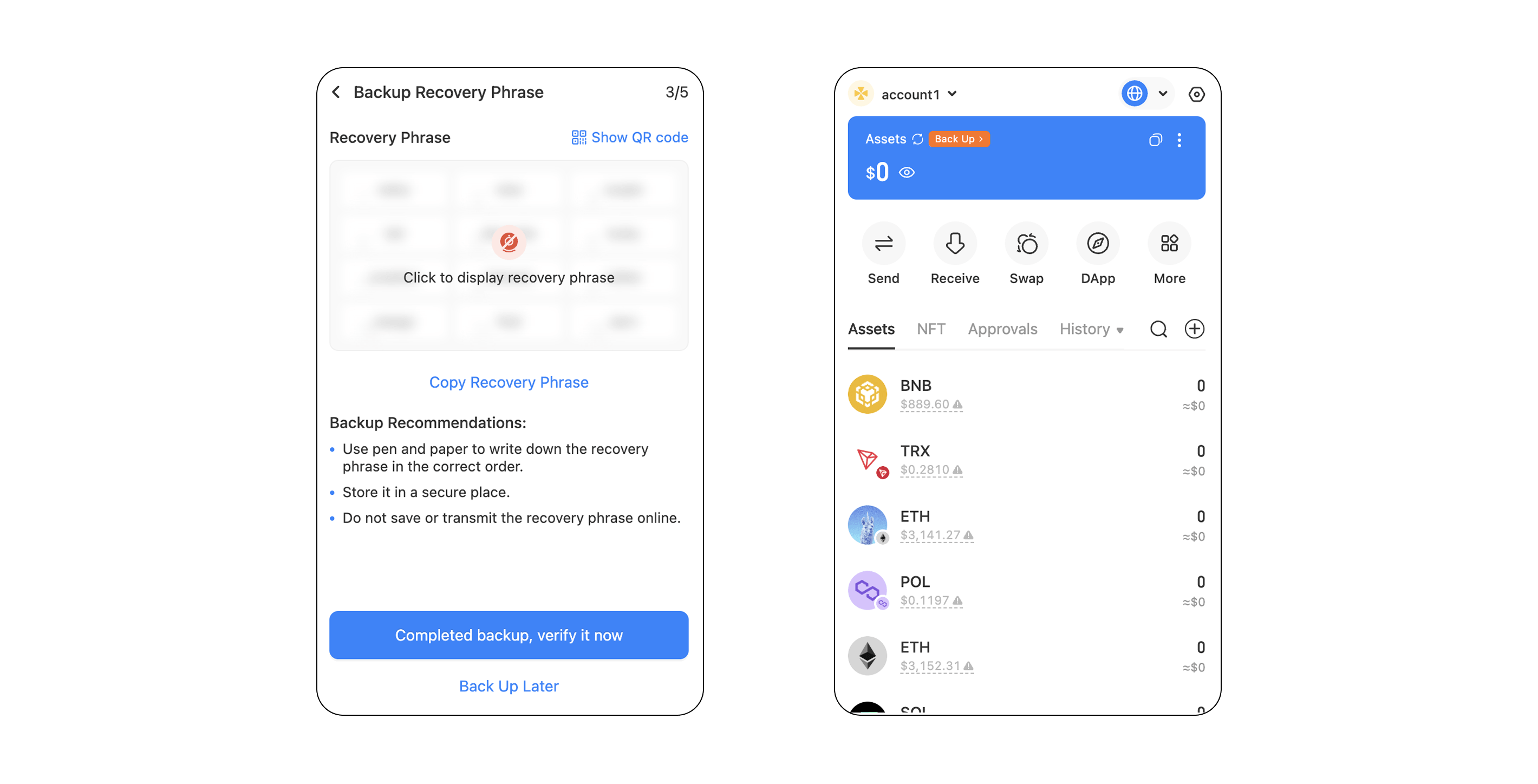
Sao lưu cụm từ ghi nhớ của bạn ngoại tuyến (ví dụ: viết nó ra giấy). Đừng bao giờ chia sẻ cụm từ ghi nhớ của bạn với bất kỳ ai, nếu không ví của bạn sẽ có nguy cơ bị đánh cắp.
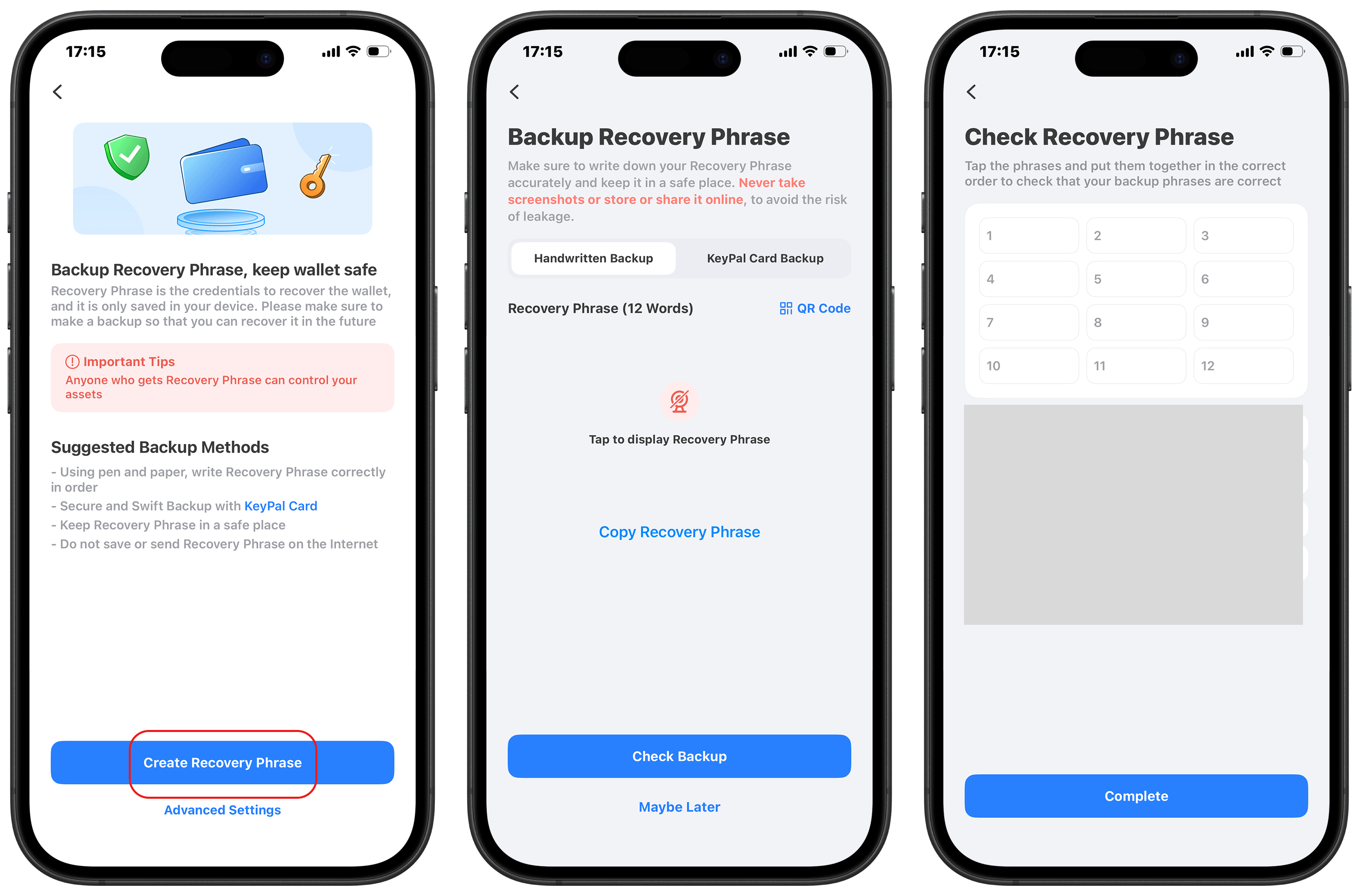
4. Hoàn tất quá trình tạo ví tiền điện tử
Chọn mạng blockchain bạn muốn nhập và đợi một lát để hoàn tất việc tạo ví.
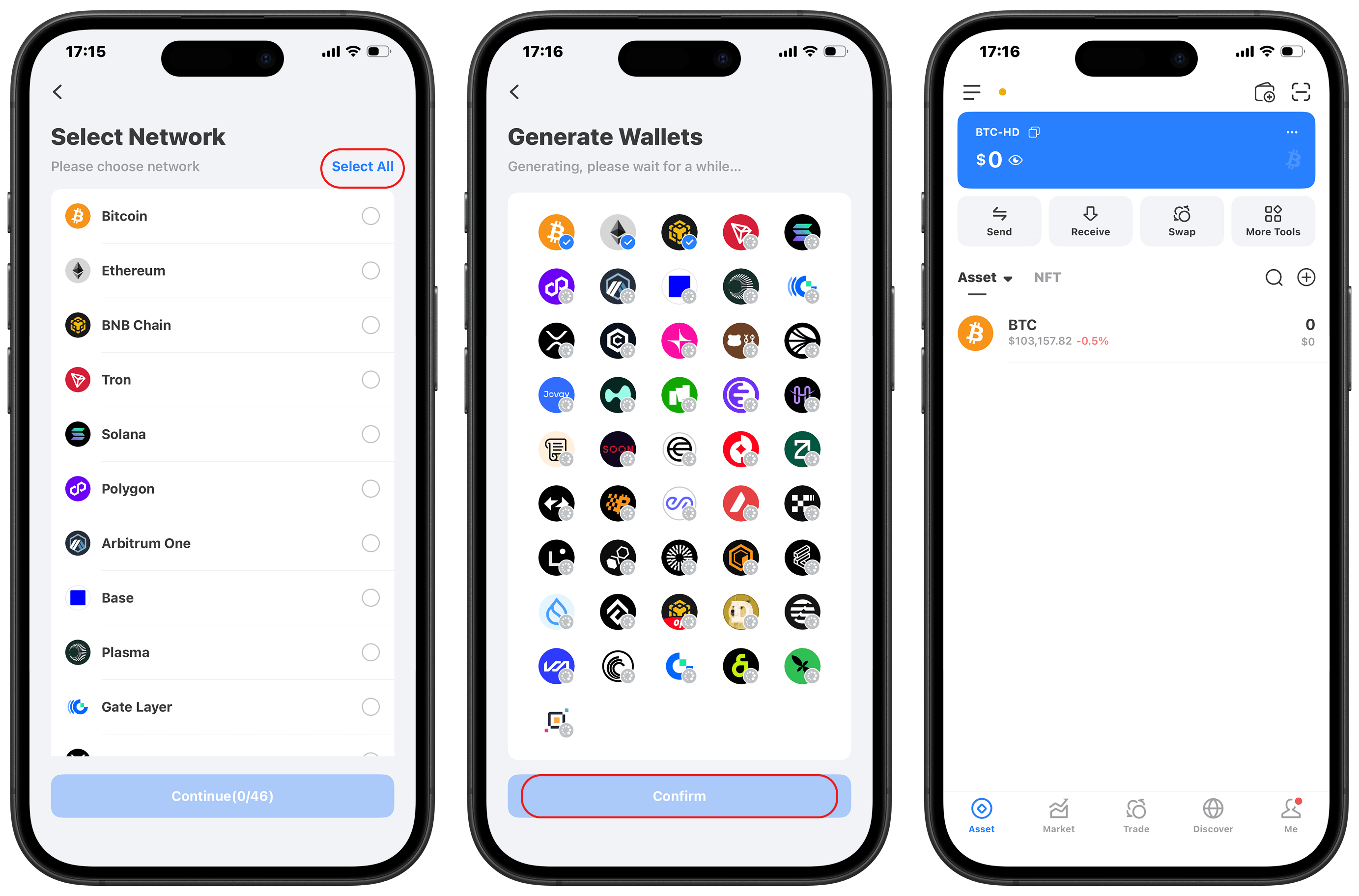
Phần 2: Các bước tạo ví tiền điện tử bằng tiện ích mở rộng của Chrome
Tìm Tiện ích mở rộng của Chrome trên trang web chính thức của TokenPocket và nhấp để cài đặt. Sau khi tạo mật khẩu ví, hãy làm theo lời nhắc để sao lưu cụm từ ghi nhớ của bạn. Sao lưu cụm từ ghi nhớ của bạn ngoại tuyến (ví dụ: viết nó ra giấy) để hoàn tất việc tạo ví. Đừng bao giờ chia sẻ cụm từ ghi nhớ của bạn với bất kỳ ai, nếu không ví của bạn sẽ có nguy cơ bị đánh cắp.
Câu hỏi thường gặp về Ví tiền điện tử
1. Ví nào tốt nhất cho tiền điện tử?
Ví "tốt nhất" phụ thuộc vào hoạt động của bạn. Ví nóng (Phần mềm) lý tưởng để sử dụng hàng ngày và DApps, trong khi ví lạnh tiền điện tử (Phần cứng) là an toàn nhất để lưu trữ lâu dài.
Khuyến nghị: Để được hỗ trợ đa chuỗi mạnh mẽ và trải nghiệm tất cả trong một trên hệ sinh thái Web3, TokenPocket ví di động không giam giữ là sự lựa chọn hàng đầu.
2. Ví tiền điện tử nào an toàn nhất?
An toàn nhất là ví không giám sát, nơi bạn kiểm soát các khóa riêng tư. Ví phần cứng cung cấp bảo mật tối đa vì các khóa luôn ngoại tuyến. Trong số các tùy chọn phần mềm, TokenPocket an toàn vì nó không bị giám sát và mã hóa khóa của bạn cục bộ.
Mẹo an toàn quan trọng: Luôn nhớ rằng việc bảo vệ Cụm từ ghi nhớ của bạn khi ngoại tuyến là biện pháp bảo mật tối ưu.
3. Ví tiền điện tử có miễn phí không?
Có, phần mềm ví thường được tải xuống và cài đặt miễn phí.
Bạn chỉ phải trả phí giao dịch mạng (Gas) khi bạn gửi tiền hoặc tương tác với DApps. Khoản phí này sẽ được chuyển đến người xác thực blockchain chứ không phải cho nhà cung cấp ví.
Phần kết luận
Trong thế giới phi tập trung, tự do đi kèm với trách nhiệm. TokenPocket cung cấp cơ sở hạ tầng an toàn, nhưng sự cảnh giác cá nhân của bạn là tuyến phòng thủ cuối cùng. Luôn nhớ nguyên tắc vàng: Không phải chìa khóa, không phải tiền điện tử của bạn! Giữ cụm từ ghi nhớ của bạn an toàn và bí mật trong môi trường ngoại tuyến. Bây giờ bạn đã sẵn sàng khám phá không gian Web3 một cách an toàn và tự tin.
Tuyên bố miễn trừ trách nhiệm
Đầu tư và sử dụng tiền điện tử liên quan đến rủi ro thị trường, pháp lý và kỹ thuật. Tiến hành thận trọng. Luôn giữ an toàn cho cụm từ ghi nhớ và khóa riêng của bạn và không bao giờ chia sẻ chúng với bất kỳ ai. Bài viết này chỉ nhằm mục đích cung cấp thông tin và không phải là lời khuyên đầu tư. Trước khi sử dụng bất kỳ ví nào, hãy tự nghiên cứu và đảm bảo tuân thủ luật pháp và quy định của địa phương.
Bài viết liên quan