Bagaimana Cara Menggunakan Layanan Pembayaran Stablecoin Gas?
Bagaimana Cara Menggunakan Layanan Pembayaran Stablecoin Gas? Satu Klik untuk Mengakhiri Biaya Token Asli Gas!
Bagian 1: Apa Itu Layanan Pembayaran Stablecoin Gas?
Di dunia Web3, tindakan seperti transfer, pertukaran, operasi lintas rantai, atau panggilan DApp semuanya memerlukan pembayaran "biaya jaringan". Pada rantai EVM tradisional (seperti Ethereum, BNB Chain, Polygon, dll.), pengguna harus memegang token asli (seperti ETH, BNB, POL) untuk membayar Gas.
Hal ini sering membingungkan para pemula: mereka memiliki USDT di dompet mereka, namun tidak dapat beroperasi karena mereka tidak memiliki token asli. Stablecoin TokenPocket Fitur pembayaran gas, didukung oleh teknologi dompet EIP-7702, memungkinkan pengguna membayar biaya jaringan secara langsung dengan stablecoin (seperti USDT), memungkinkan pengalaman "berjalan on-chain tanpa memegang token asli"!
Layanan pembayaran stablecoin gas sekarang mendukung beberapa rantai: BNB Chain, ETH, Solana, TRON, Base, Polygon, dan ARB, dengan lebih banyak jaringan yang ditambahkan secara terus menerus.
Bagian 2: Bagaimana Cara Menggunakan Pembayaran Stablecoin untuk Transfer?
Peringatan: Sebelum menggunakan fitur ini, pastikan dompet Anda telah diupgrade ke versi terbaru, dan selalu unduh dari situs resmi www.tokenpocket.pro untuk menjamin keamanan aset Anda.
1. Unduh dan Buka TokenPocket
Unduh dan buka TokenPocket, cari "Kirim" dan ketuk, lalu pilih token yang ingin Anda transfer.
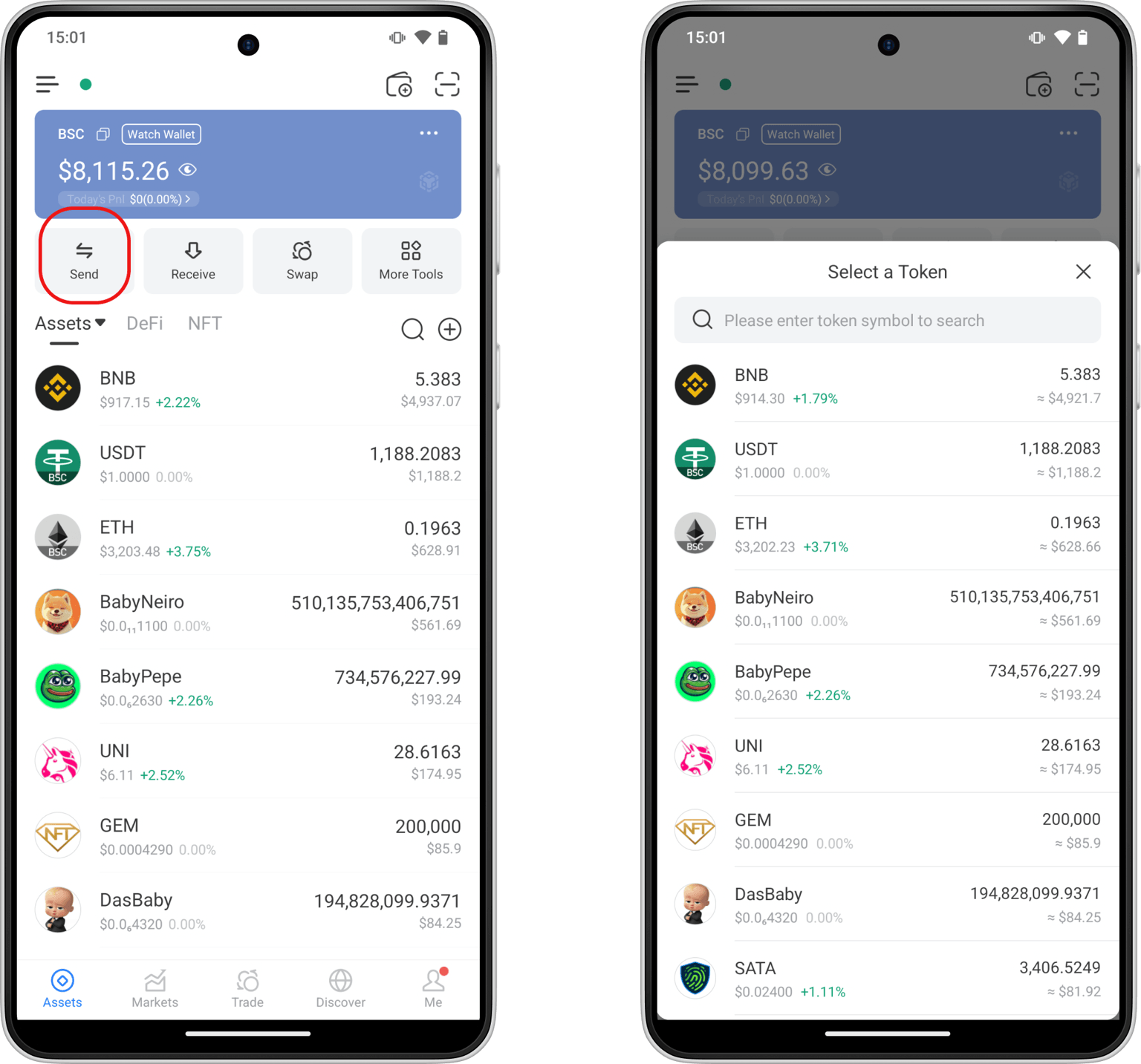
2. Pilih Token untuk Biaya Jaringan
Di bagian "Biaya Jaringan", ketuk "Metode Pembayaran". Selain token asli, Anda juga dapat memilih stablecoin (seperti USDT) untuk membayar biaya jaringan.
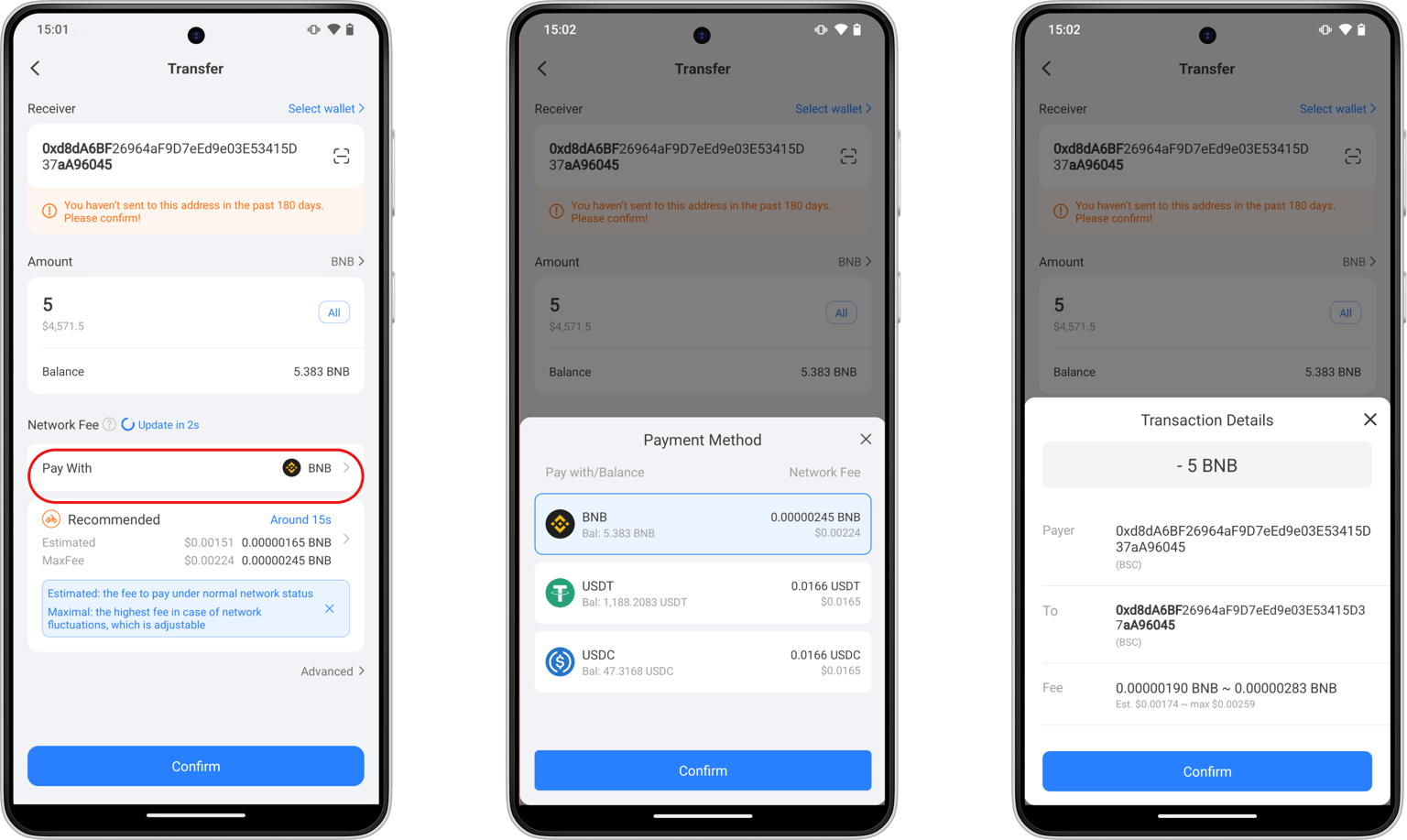
Bagian 3: Bagaimana Cara Menggunakan Fitur Pembayaran Stablecoin untuk "Swap & Cross-Chain"?
1. Unduh dan Buka TokenPocket
Unduh dan buka TokenPocket, ketuk "Trade" di bagian bawah layar, lalu isi informasi yang relevan dan ketuk "Konfirmasi Swap". Ikuti petunjuk untuk meningkatkan dompet Anda ke dompet pintar EIP-7702.
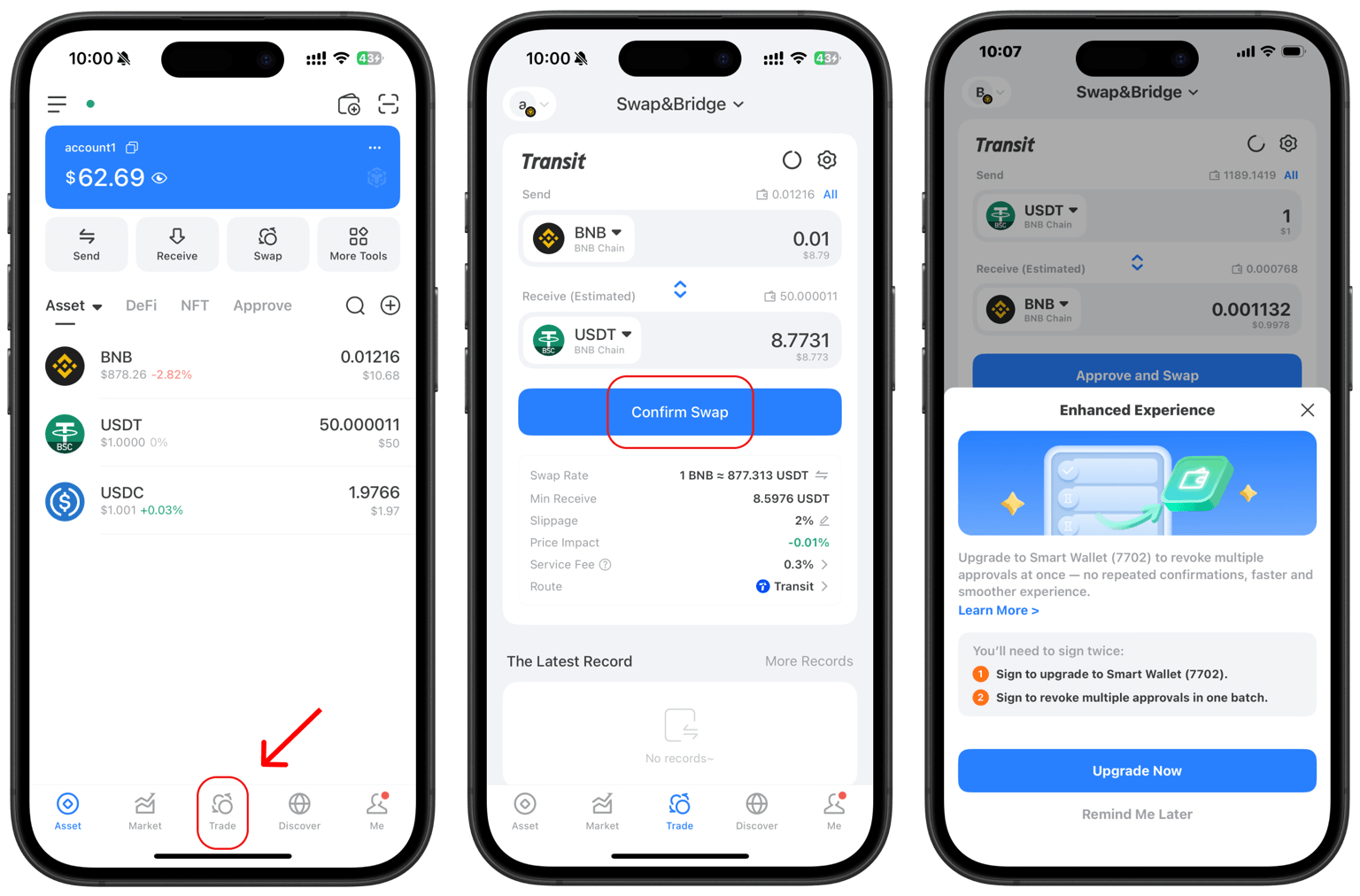
2. Pilih Stablecoin sebagai Biaya Jaringan
Setelah meningkatkan dompet Anda, kembali ke halaman perdagangan, isi informasinya, dan mulai transaksi lagi. Ketuk bagian "Biaya Jaringan", lalu ketuk "Bayar Dengan". Anda sekarang dapat memilih stablecoin sebagai biaya jaringan sesuai dengan kebutuhan Anda.
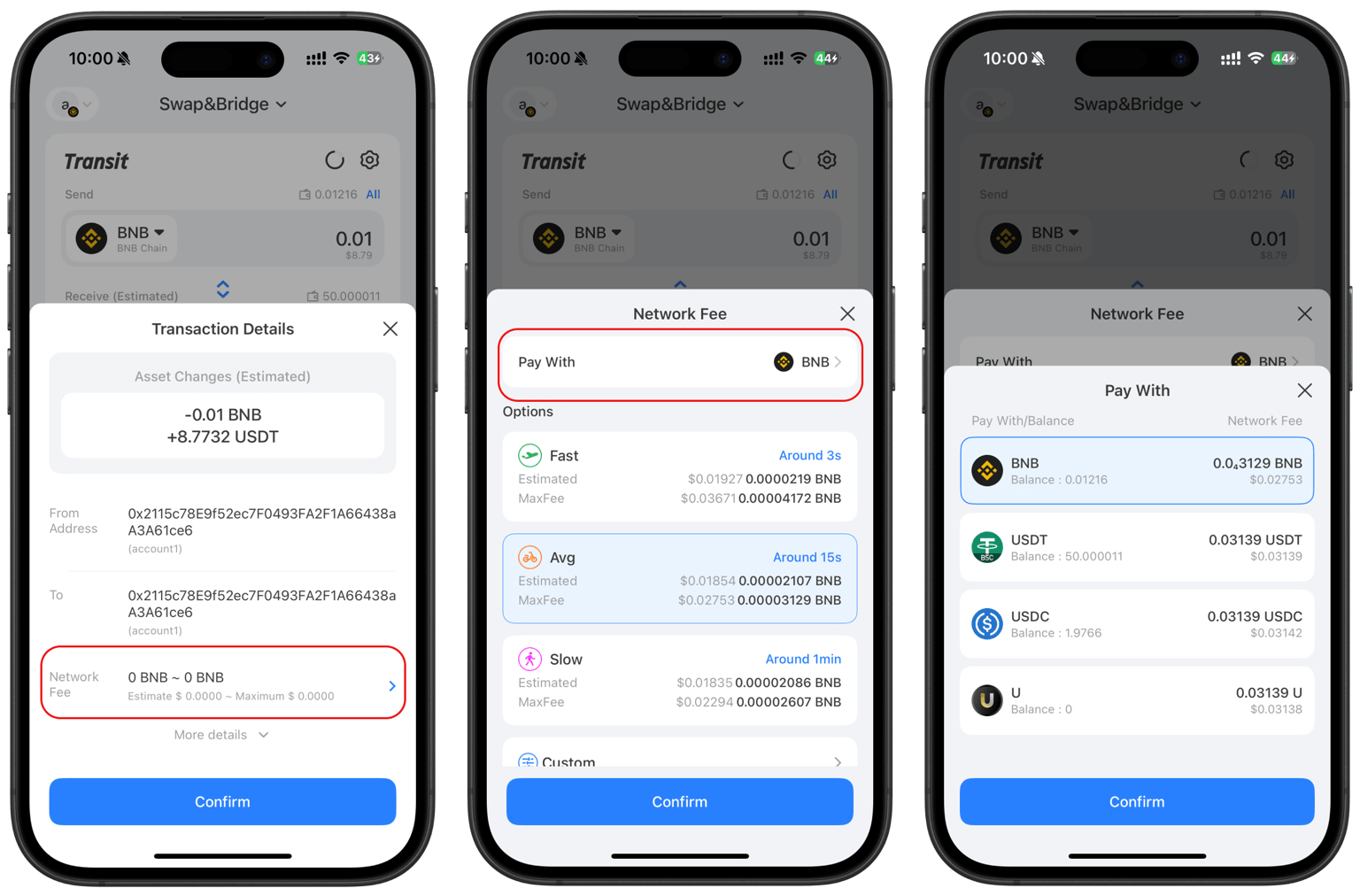
FAQ tentang Pembayaran Stablecoin Gas
1. Bisakah saya membayar biaya gas dengan USDT?
Ya. Dompet TokenPocket mendukung pembayaran biaya gas secara langsung dengan USDT, memungkinkan transfer stablecoin tanpa biaya atau biaya rendah pada rantai seperti Tron, BSC, Solana, dan Polygon.
2. Bisakah Anda melakukan pembayaran dengan stablecoin?
Ya. Dompet TokenPocket memungkinkan Anda melakukan pembayaran dan membayar biaya jaringan secara langsung dengan stablecoin tanpa perlu memegang token asli.
Kesimpulan
Dengan teknologi EIP-7702, TokenPocketFitur pembayaran stablecoin sepenuhnya menghilangkan hambatan "terjebak tanpa token asli". Ini menyederhanakan operasi on-chain yang kompleks menjadi pengalaman intuitif yang mirip dengan menggunakan aplikasi pembayaran, memungkinkan Anda untuk lebih fokus pada transaksi itu sendiri daripada persiapan saldo token asli yang membosankan.
Penafian
Berinvestasi dan menggunakan mata uang kripto melibatkan risiko pasar, hukum, dan teknis. Silakan lanjutkan dengan hati-hati. Pastikan untuk menjaga frasa mnemonik dan kunci pribadi Anda dengan baik, dan jangan pernah mengungkapkannya kepada siapa pun. Artikel ini hanya untuk referensi dan bukan merupakan nasihat investasi. Sebelum menggunakan dompet apa pun, harap lakukan riset sendiri dan pastikan Anda mematuhi hukum dan peraturan setempat.
Artikel Terkait